Bulk converting Office documents to PDF
When you need to convert multiple documents to PDF for distribution (or from one Office format to another) there are a few utilities around. The most workable I found is the UNOCONV utility which is build on top of LibreOffice / OpenOffice. This uses the OpenOffice conversion facilities rather than a simple PDF print driver.
On Ubuntu it can be installed via Software Center or via apt-get from the core repositories.
Jitsi Ubuntu VoIP SIP Client
The latest instalment in my never-ending quest to find a decent SIP client (see Ubuntu SIP I & Ubuntu SIP II) I came across JITSI (http://jitsi.org/). Since the website looked very interesting and the project seems very well maintained (http://jitsi.org/index.php/Main/Screenshots) I decided to give it a go.

The installation is a breeze with a Ubuntu/Debian package available and the installation also adds the repository to keep the package up to date.
Installing Samsung Multifunction Printer - Ubuntu 11.10
Getting Multifunction Printers to scan under Linux can be a bit of a pain. The Samsung SCX-3400 I had to install recently was no exception.
Here are the necessary steps I had to perform:
- Ignore all Samsung Provided CD’s and downloads. They do not work under Oneiric Ocelot (11.10)
- Add Samsung Unified Driver repository http://www.bchemnet.com/suldr/smfpv3.html
- Install Samsung drivers and libsane-extras
- Edit sane configuration files
vim /etc/apt/sources.list
#add the Samsung Unified Driver Repo
deb http://www.bchemnet.com/suldr/ debian extrawget http://www.bchemnet.com/suldr/suldr.gpg
apt-key add suldr.gpg
apt-get update
apt-get install samsungmfp-data samsungmfp-driver samsungmfp-network samsungmfp-scanner samsungmfp-configurator-data samsungmfp-configurator-qt4 libsane-extrasThe following sane config files need to be modified (add lines)
Connecting to Cisco Small Business VPN from Ubuntu
Connecting to IPSec VPN gateways has always been one of the more painful things to do. Unfortunately Cisco is not helping by being extremely sluggish on making their utilities available on most recent OS revisions (you can’t even get their QuickVPN client to work properly on 64bit Win7 yet). Operating System support outside of Windows seems to be pretty much non-existent (see https://supportforums.cisco.com/thread/2040595).
Shame on you Cisco !
Option 1 – running QuickVPN under using wine
Download the QuickVPN client
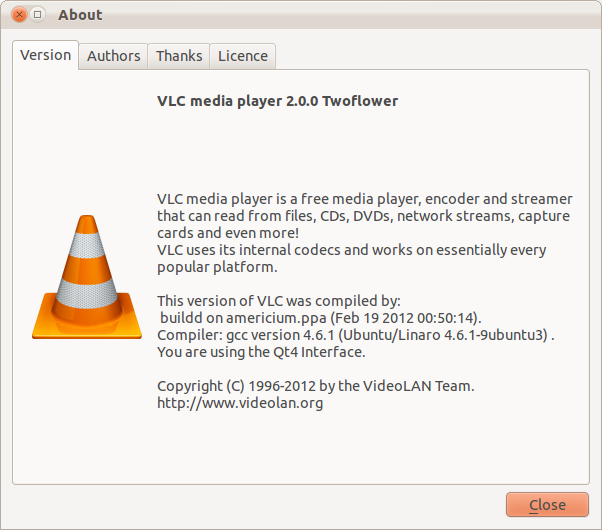
Installing VideoLAN VLC 2.0 on Ubuntu 11.10
With the release of the final VLC 2.0 player you need to add a back-port (the next version 12.04 will have it included in the main repositories) PPA to Oneiric Ocelot (11.10)
sudo add-apt-repository ppa:n-muench/vlc
sudo apt-get update
sudo apt-get install vlcThanks to Nate Muench for providing this !
Finding a Notepad++ alternative / replacement on Ubuntu
One of the most important utilities on any computer is a decent text editing tool. Since there are as literally hundreds of text-editors out there you would think it is an easy task to find a similar one for each platform.

After years of trialing on various Windows platforms I have found Notepad++ to be the most useful of them all (closely followed by EMEditor which I used for years before Notepad++). Since I have now switched to Ubuntu completely it was necessary to find a permanent alternative on that platform since Notepad++ is only available on Windows.
Getting a handle on Ubuntu mobile power management
To get an idea on the current power usage and some suggestions on how to improve power-management ‘powertop‘ is a must-have.
sudo apt-get install powertop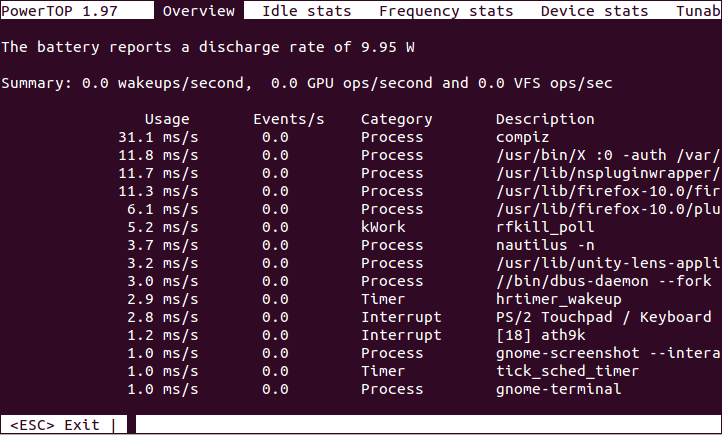
- Powertop Screenshot
Turning the Toshiba Z830 into a Ubuntu Ultrabook

EDIT: Here are some tweaks if you install 12.04 (Precise Pangolin).
Since I will have to do a fair amount of traveling in the next year I was in need of upgrading my trusted workhorse of Toshiba Qosmio F60 to a more portable option that will be easier on the shoulders during long travels. After doing some research into which of the major manufacturers offer the best support for a Linux based Operating System it came down to a final two: the Intel i7 variants of Samsung Series 9 and the Toshiba Z830.
Install Microsoft Fonts on Ubuntu
If you have kids going to school you will know these questions:
- Why can’t you have Microsoft Office ?
- I can not find ‘xyz’ font on this …. – why ?
I have managed (after some time) to convince my kids that there is no need for having a particular Word Processing Software and they are much better off knowing the concepts of text processing rather than some particular office package. Unfortunately I have had no look convincing many teachers that they should follow a similar principle ….
Using Blackboard Collaborate (Elluminate) on Ubuntu
Like it or not (personally I am in the second category) Blackboard Collaborate or Elluminate (as it is still more commonly referred to) is something you have a hard time avoiding if you work in online education.
I discovered that I have audio issues on some Ubuntu Linux machines and found the following to fix the issues.
1) Install alsa-aoss
apt-get install alsa-oss2) Save the Elluminate Java Webstard (.JNLP) file to a local folder – DO NOT OPEN IN BROWSER
3) Launch Elluminate using this command (in the folder you saved the JNLP)
Ubuntu - create manual application launcher (Unity)
With every new release of Ubuntu I am becoming more resigned to the fact that the effort to revert back to the Ubuntu Classic (Gnome 2) interface is getting harder and sooner or later I will have to bite the bullet and learn to live with the ugly and more cumbersome Unity interface (specially since Gnome 3 seems to be even worse). One of the first issues I found is that there seems to be no easy way to manually add programs to the “Launcher” (as well as to the applications list).
Installing Java6 JDK on Ubuntu 11.10
UPDATE: To install on 12.04 (Precise Pangolin) you need a different PPA.
Since sun-java6-jdk has been removed from the default Ubuntu 11.10 (Oneiric Ocelot) repositories you need to add a PPA repository (unless you want to install by hand)
sudo add-apt-repository ppa:ferramroberto/java
sudo apt-get update
sudo apt-get install sun-java6-jdk sun-java6-plugin